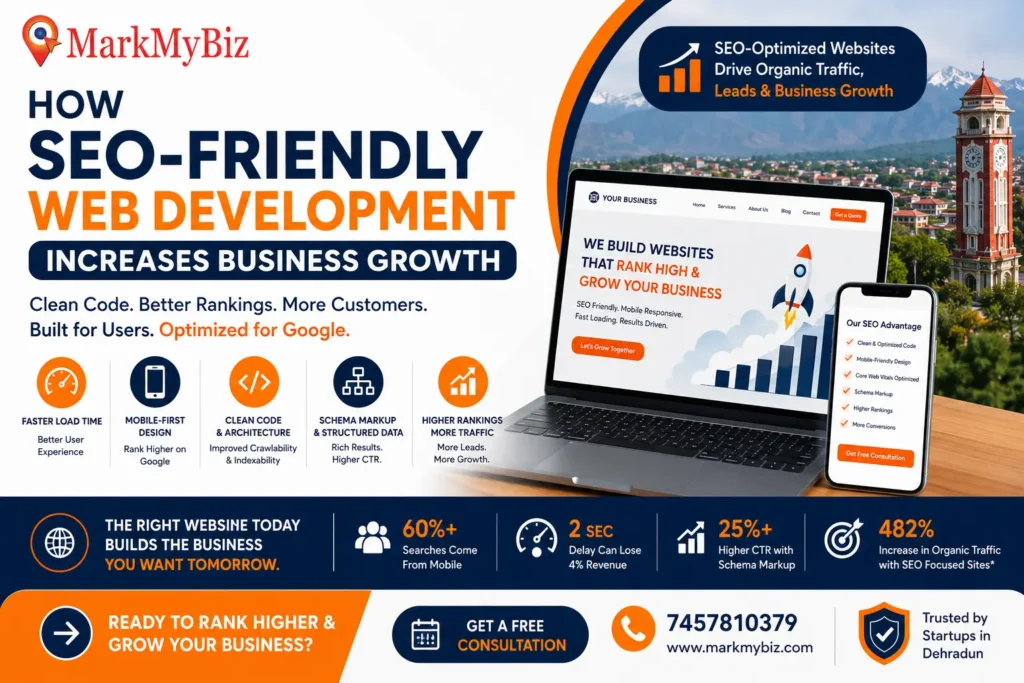
SEO-friendly web development means building websites with clean, optimized code and structure so search engines can easily crawl and rank them. When done right, it drives more organic traffic and business growth. As MarkMyBiz explains, “search engine optimization helps your site show up in Google…driving organic (free!) traffic and helps you reach your business goals”. In practice, an SEO-optimized site naturally attracts qualified visitors – for example, a faster, well-structured site not only ranks higher but also keeps users engaged. The result is higher conversions and revenue. In fact, one case study saw organic traffic grow 482% and generated 667× return on investment after 21 months of SEO-focused development. This real ROI underscores how technical SEO work (clean code, architecture, speed, etc.) translates into tangible business growth.
What is SEO-Friendly Web Development?
SEO-friendly web development goes beyond aesthetics. It integrates technical SEO principles into the design and code of a website from the ground up. This means using semantic HTML, logical site hierarchy, optimized meta tags, and responsive layouts so that both users and search engines have a smooth experience. In other words, an SEO-friendly site has “clear navigation, well-structured content, fast loading speeds, and mobile-friendly designs” to help bots and visitors alike. Key elements include unique, descriptive title/meta tags, clean URL structures, optimized images, and properly-nested headings. The goal is to make a site that Google can crawl and index easily while also delighting users. As one SEO guide notes, when your site checks all the SEO boxes, “search engines and users [are] more likely to engage,” leading to better rankings and more traffic.
How Clean Code & Technical SEO Architecture Boost Organic Rankings
Modern SEO rests on two pillars: clean code and smart technical architecture. Search engines prefer sites with streamlined, efficient code. Clean code – meaning well-formatted HTML/CSS, minimal plugins, and no unnecessary scripts – helps crawlers scan and index content quickly. Bruce Clay highlights this: “clean code greatly influences a website’s SEO performance through improved crawlability and indexability”. In practice, removing redundant code and organizing HTML logically makes pages faster (a ranking factor) and easier for Googlebot to parse.
Clean Code Structure & Crawlability
A clean codebase means fewer obstacles for search bots. When developers write semantic HTML (using proper headings, lists, and attributes) and avoid messy inline scripts or bloated frameworks, pages become more crawlable. For example, Googlebot might struggle to find content buried in thousands of lines of complex code. By contrast, a lightweight code structure ensures search engines can reach your important content within their crawl budget. Sites with shallow, logical navigation get crawled more efficiently: design industry experts note that shallow (flat) site architectures let search engines “discover and index more pages within their crawl limits”. In short, clean, simple code and structure lead to higher indexation rates and help critical pages rank.
Mobile-First Design & Core Web Vitals
With the majority of users browsing on smartphones, mobile-friendly website design is essential. As of 2021, over 60% of Google’s search traffic came from mobile devices, and Google now uses mobile-first indexing – it predominantly uses the mobile version of your content for ranking. This means your site must work flawlessly on phones: responsive layouts, legible text, and easy navigation. Alongside this, Google’s Core Web Vitals (CWV) come into play. CWVs are performance metrics for user experience; Bruce Clay explains that sites meeting Core Web Vitals thresholds have a better chance of ranking high. The three core metrics are Largest Contentful Paint (load speed), First Input Delay (interactivity), and Cumulative Layout Shift (visual stability). A mobile-first approach ensures these metrics stay within recommended limits even on smaller screens. In summary, designing for mobile and optimizing CWVs (minimizing render-blocking scripts, compressing images, etc.) directly boosts organic rankings through Google’s Page Experience signals.
Schema Markup & Structured Data Implementation
Structured data (schema markup) tells search engines exactly what your content means, enabling rich results in SERPs. Adding schema can significantly improve visibility and click-through rates. Google’s documentation notes that pages with structured data often get “more engaging” results. In case studies, sites implementing schema saw dramatic CTR increases: Rotten Tomatoes reported a 25% higher click-through rate on pages with structured data, and Nestlé found pages displayed as rich results had an 82% higher CTR than others. This means more organic visitors from the same search impressions. Common schema types (such as Article, Product, FAQ, and LocalBusiness) can yield rich snippets like star ratings, prices, or maps, further driving clicks. Thus, implementing schema markup is a key part of technical SEO: it won’t directly improve keyword ranking, but it boosts engagement and traffic by making your listings stand out.
Page Speed & User Experience: The Hidden Ranking Factor
Web performance is now a crucial SEO factor. Google explicitly uses Core Web Vitals in ranking, and site speed strongly influences user behavior. Studies consistently show faster pages convert better. For example, Cloudflare reports that a two-second page load delay can cost about 4% in revenue per visitor. This matters for SEO because better engagement (lower bounce, longer sessions) sends positive signals to search engines. From a marketing perspective, even small speed wins have big ROI: one case study (Vodafone) showed that optimizing page speed on a landing page yielded an 8% increase in sales. In general, users expect pages to load in under 3 seconds; beyond that, bounce rates soar.
The technical side is straightforward: tools like caching, CDNs, image compression, and minimizing scripts all help. Since Google uses page experience as a ranking criterion, every millisecond counts. In short, a slow site loses both customers and SEO performance. By contrast, a well-optimized site achieves faster load times and thus better rankings and conversions.
Why Fast-Loading Websites Convert Better
Speed has a direct business impact. Faster-loading pages mean visitors stick around and are more likely to buy or sign up. Research highlights this vividly. Vodafone ran an A/B test where the optimized version of a page had a 31% faster Largest Contentful Paint; that page saw 8% more sales than the slower version. Similarly, a study by Propellernet found that visits to pages that loaded quicker-than-average were 34% more likely to convert than slower visits. In concrete terms, optimizing speed is like increasing your marketing budget: it substantially boosts conversions. Google’s own guidance also notes that half of mobile users abandon sites taking longer than 3 seconds, emphasizing that every speed improvement keeps more users engaged. In summary, fast page speed improves both user satisfaction and SEO, making it a “hidden” but critical ranking factor.
Measuring Core Web Vitals: LCP, FID, and CLS
Monitoring Core Web Vitals gives clear targets for performance. The three key metrics are:
- Largest Contentful Paint (LCP): Time for the largest content (e.g. hero image or main heading) to load. Good LCP is ≤2.5 seconds. Slow LCP often means server delays or large images, so fix by optimizing images or server response.
- First Input Delay (FID) (now replaced by Interaction to Next Paint): Measures delay before a page responds to a user’s first interaction (tap or click). Good FID/INP is ≤100–200ms. High values indicate heavy JavaScript or long tasks.
- Cumulative Layout Shift (CLS): Quantifies how much visible elements move during loading (visual stability). Good CLS is ≤0.1. Shifts often come from late-loading images or ads without reserved space.
Measuring these metrics can be done via Google’s PageSpeed Insights or Search Console’s Core Web Vitals report. Improving them typically involves image optimization, deferring non-critical scripts, using dimension attributes on images, and leveraging browser caching. Since Google’s page experience update incorporates these metrics, keeping LCP, FID (INP) and CLS in the “Good” range helps ensure the site remains competitive in search results.
Organic Traffic Growth: The Real ROI of SEO-Optimized Websites
The ultimate goal of SEO-friendly Website development is sustainable organic traffic growth. A well-coded, authoritative site earns more visibility over time, and that traffic is essentially free (compared to paid ads). Technical optimizations amplify this growth. For instance, a flat site structure means more pages get indexed and updated content appears faster in search results. This broad crawlability ensures new or improved pages start driving traffic quickly.
In terms of ROI, SEO can vastly outperform other channels. As one SEO case shows, consistent organic efforts resulted in a 482% increase in traffic and a 667× ROI in under two years. Even on smaller scales, businesses see real gains: a local retailer who revamped their site with SEO best practices often finds search traffic doubling within months. This happens because search engines reward sites where users have good experiences: clear structure, relevant content, and engaging pages encourage repeat visits and word-of-mouth sharing.
How Proper Site Architecture Improves Crawl Efficiency
A solid site architecture is the backbone of organic growth. Search bots have limited “crawl budgets,” so a shallow, well-organized site lets crawlers index more content. Flat site structures (keeping pages within 2–3 clicks of the homepage) improve crawl efficiency and fast-track new content in the index. As industry experts note, this reduces crawl depth so “search engines can reach and index more pages within their crawl limits”. Practically, this means reworking deep navigation, consolidating related pages, or creating silos. The result is that when you add new blog posts or products, they get discovered by Google quickly, accelerating traffic growth.
Internal Linking Strategy for Topical Authority
Once your pages are indexed, internal linking spreads authority and relevance throughout your site. Internal links act like votes, signaling which pages are important. Yoast SEO highlights that “internal links…enhance crawlability, improve your search engine rankings, and boost your topical authority”. In practice, this means linking related pages naturally: for example, linking your blog posts to relevant service pages or vice versa. Balanced, contextual links with clear anchor text distribute link equity evenly. This helps Google understand the connections between topics, establishing your site as an authority in that niche. Effective internal linking keeps users exploring longer (reducing bounce rates) and ensures Google can find every key page – both outcomes that strengthen your SEO and organic traffic over time.
Security, HTTPS & Trust Signals: How Google Rewards Secure Sites
Security and trust are integral to modern SEO. Google prefers secure websites: in fact, HTTPS has been a ranking signal since 2014. At that time Google announced that sites with HTTPS would receive “a small ranking boost”. Today, it’s bigger than small – Google’s Page Experience also includes secure connection as part of user experience. Beyond search engines, user trust is at stake. Straight North explains that insecure (HTTP) sites now get flagged as “Not Secure” by browsers. This warning visibly deters visitors: users may question if the site can be trusted, especially if personal data is involved. In contrast, HTTPS with a valid TLS certificate shows a padlock icon, building credibility. As Straight North summarizes: HTTPS “helps establish trust and credibility” and prevents Google from penalizing your site for putting users at risk.
In short, enabling HTTPS is a must – it secures user data, meets Google’s criteria, and improves user experience. It’s one of the simplest yet most important SEO-friendly development practices. MarkMyBiz’s web servers already use HTTPS by default, ensuring all pages benefit from this trust signal.
SEO-Friendly Web Development vs. Traditional Website Design
Not all website projects are equal when it comes to SEO. Traditional web design often focuses on look-and-feel with limited consideration for search engines. By contrast, SEO-friendly development fuses design and optimization from day one. For example, many template-based sites (Wix, Squarespace, generic WordPress themes) come “out of the box” with minimal SEO built in. Such templates may load extra code or limit header structure – “these solutions aren’t built for SEO,” as one expert notes. Without expert intervention, the site’s architecture and metadata may not follow current SEO best practices.
Custom Development vs. Template Solutions
The choice between a custom-built site and a template can have SEO implications. Custom website development offers unmatched flexibility: every aspect (layouts, code, databases) is crafted to your needs. ThePixel points out that custom sites are “great for SEO” because they can be built around best practices. You control the code and can optimize every page element (headings, images, load strategy) exactly.
By contrast, templates allow quick launch and lower cost, but often include extra features you don’t need (bloat) and restrict deep optimization. ThePixel warns that templates “may include a few SEO options, but without an expert there is no guarantee the architecture…follows SEO best practices”. In practice, a template site might not support advanced schema or have rigid URLs. These limitations can cap your SEO potential.
Long-Term SEO Value: Why Bespoke Websites Win
Over time, a custom (bespoke) website typically delivers higher SEO value. Custom code allows continuous improvements: you can fine-tune page speed, update site architecture, and add new markup without being constrained. Naturaily (a web agency) advises choosing custom development when “performance, SEO, or Core Web Vitals are business-critical” for your project. They emphasize that a custom site “gives full control over information architecture, page structure, [and] performance optimization”. This control means you can adapt as SEO evolves, integrating new standards immediately.
In contrast, template sites may struggle long-term as your business grows or algorithms change. Custom sites also tend to have cleaner, leaner code (since templates often have unnecessary generic features), leading to better core performance. All else equal, a well-built custom site will maintain and build ranking equity far longer than an out-of-the-box design. Over years, that translates into sustained traffic and leads. For serious businesses, this “SEO foundation” can pay dividends far beyond initial costs.
How to Choose an SEO-Friendly Web Development Company
Choosing the right development partner is crucial. Look for a company or team that understands SEO as part of their process, not an afterthought. Some red flags and key questions include:
- Red Flags to Avoid: Be cautious if a developer or firm guarantees top rankings (no one can guarantee that) or if they sideline SEO talk. If the team dismisses page speed, mobile optimization, or security as concerns, consider that a warning sign. Also avoid any provider that gives vague answers about their process. A trustworthy developer should explain their approach to crawlability, site structure, and technical SEO. Finally, be wary of hidden costs: for example, some low-cost template solutions lock you into proprietary hosting. (As one expert notes, if you stop paying, “your website is taken down” with some template vendors.)
- Questions to Ask Your Web Developer About SEO: Direct questions are the best test of SEO expertise. Ask them to describe their SEO strategy. Will they conduct keyword research? How will they structure pages and metadata? Business.com advises asking developers: “What does your SEO strategy look like?…Do you conduct keyword research and follow technical SEO best practices, such as clean site architecture and optimized metadata?”. This question checks if they plan title tags, headings, and URLs thoughtfully. Also ask about performance: “How will you ensure the site is fast and mobile-friendly? Are you familiar with Core Web Vitals?” A good developer will explain how they optimize loading (e.g. image compression, minimizing scripts) and ensure mobile responsiveness. If the developer can’t clearly address these, you might need to seek a partner with stronger SEO/tech skills.
Other useful questions: “Will I have full control of my hosting and code?” (to avoid being locked into a platform), “How do you handle security (HTTPS) and site backups?”, and “Can you share examples or case studies of sites you’ve built that rank well in search?” Finally, check references or reviews: ask to speak with past clients about how the company delivered on SEO and technical promises.
Case Study: How SEO-Friendly Development Transformed a Business
Consider a real-world example of SEO-friendly development in action. Vodafone conducted an A/B test with two identical landing pages; the only difference was that one was optimized for Core Web Vitals (faster LCP, etc.). The result? The optimized page generated 8% more sales than the baseline. Similarly, companies like Propellernet have demonstrated that just making pages load faster can increase conversion likelihood by over a third.
While these are large-brand cases, the principle applies to businesses of any size. For example, a local retailer who redesigned their site with a focus on speed, structure, and on-page SEO might see significant gains. Even without a dramatic percentage stat, they would notice higher search rankings and more consistent traffic. In short, aligning web development with SEO (fast hosting, mobile-friendly design, structured data, etc.) leads to measurable gains. The specific metrics will vary, but across industries, the link between technical excellence and business growth is clear – an SEO-friendly build earns more traffic that converts into revenue.
FAQ: Common Questions About SEO-Optimized Web Development
- Q: Do I just need good content, or does development really matter?
A: Both are crucial. Even the best content can get buried if search engines can’t crawl your site or if it loads slowly. SEO-friendly development ensures your content is visible. It handles the technical foundation (like site speed, crawlability, mobile-responsiveness) so that your content and keywords can do their job. - Q: How long before I see SEO results from a new site?
A: SEO is a long-term game. You may start seeing improved rankings and traffic within a few months, especially if the old site was poorly optimized. Generally, expect several months to a year for full effects. Continue adding quality content and monitoring performance; over time, the gains compound. - Q: I already have a website template. Can’t I just tweak it for SEO?
A: You can improve a template-based site by optimizing titles, headings, and images, but you may hit limits. Many templates include extra code and fixed structures that are hard to change. For truly SEO-focused sites, custom development offers the flexibility to build lean code, precise schemas, and optimal architecture that a template might not allow. - Q: Do search engines penalize sites that aren’t HTTPS or fast?
A: Google doesn’t “penalize” slower sites, but it prefers faster sites. Page speed and security (HTTPS) are ranking signals. An HTTP site will be labeled “Not Secure” by browsers, which scares visitors. HTTPS is easy to enable today and is considered a basic requirement. A secure, fast site will always rank and convert better than one that leaves users waiting or worried. - Q: My business is local (e.g. in Dehradun). Does this advice apply?
A: Absolutely. In fact, local SEO benefits even more from technical optimizations. Ensuring your site is mobile-friendly, fast, and uses localized schema (e.g. address markup) helps Google show your business to nearby searchers. For example, MarkMyBiz (a Dehradun web agency) highlights itself as a “top web development company in Dehradun” to attract local businesses. You should similarly include location signals (like city and state in content and metadata) to win local searches.